Getting Started
Dedicated wreck divers depend heavily on maps and charts to help them find what they're looking for. Paper versions of these documents are quickly giving way to electronic ones, and today's divers do more and more of their research on computers. This page contains links to a variety of New England maps and charts, and related chart information.
Online Maps and Charts
A complete set of NOAA's nautical charts (RNC charts) are available for online viewing using NOAA's Online Chart Viewer. You'll need to select the region (Atlantic Coast or whatever) and the chart you want to view. Once the chart is displayed, you can move around, zoom in and out, and print portions for your records. These online charts are not to be used for navigation.
Online maps are available at Google Maps and other map sites.
Electronic Chart Viewing - Laptop or Chart Plotter
These days most boaters and divers use electronic charts. They are convenient and fun to use, and very accurate. But choosing a chart viewing system and learning how to use it, requires some effort on your part. If you're new to this endeavor, you'll need to read up on the subject and consult some experts.
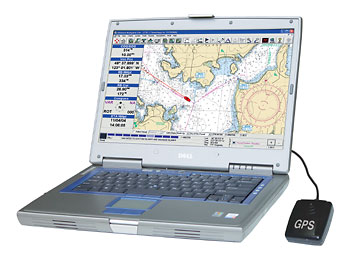
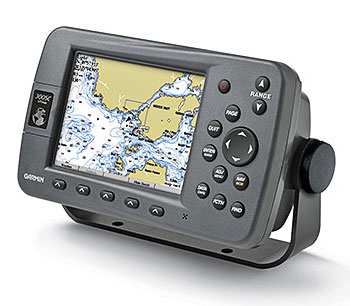
Basically there are two types of chart viewing systems - laptop computers and chart plotters. Because of their versatility, laptops offer more user options than chart plotters. But because they are not splash-proof, laptops are generally not suitable for open boat use. Most chart plotters, on the other hand, are built tough for use in an open boat.
If you're using a laptop computer, you'll need to install chart viewing software and charts, and connect a GPS receiver. If you're using a chart plotter, the unit probably will come with all the necessary components and software. For either system, make sure you have all the chart images that you may need. Depending on your system, chart images are stored on a hard disk, flash memory card or other storage device.
Laptop Computer
Chart Plotter
NOAA's Electronic Charts
The National Oceanic and Atmospheric Administration (NOAA) produces nautical charts for all U.S. coastal waters. For many years, NOAA has produced the paper charts we all know and use. A few years back, the agency created scanned digital images (raster images) of these charts and made them available for use on computers, chart plotters, etc. These scanned images are known as RNC Charts and are available for free download from a NOAA website (link below).
For the past few years NOAA has been developing a new type of electronic charts called ENCs. The ENC charts are advanced vector images that are linked to a database of related navigation information such as water depths, descriptions of obstructions, etc. NOAA's ENC chart collection is currently under development. Many charts are available now and many more are in the pipeline. As with raster charts, NOAA operates another Web site (link below) from which you can download ENC charts and chart viewing software - free of charge.
Maptech (a NOAA contractor) offers a complete set of NOAA's RNC charts for purchase on a DVD. This DVD is available from Maptech's website and other boating supply outlets.
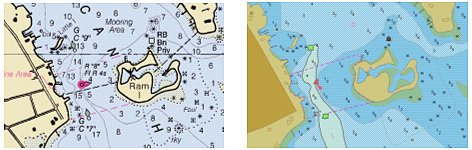
These days many boaters and divers are wondering which electronic chart format (RNC or ENC) is the best one for them to use. Both contain large amounts of information and the chart cost (in some cases free) is basically the same. As shown below, the two chart formats look different, but either can usually do the job.
NOAA RNC (Raster) Chart
NOAA ENC (Vector) Chart
Chart Download SitesBelow are links to some important chart download sites:
NOAA's RNC (Raster) Chart Download Site
NOAA's ENC (Vector) Chart Download Site
Maptech's Chart DVD Purchase Site
GPS Calculators The GPS Visualizer website contains easy-to-use calculators for converting GPS coordinate formats and calculating the distance between any two points. If you'd like to use these calculators while working with electronic charts, click here to display the calculator page in a new window.
GPS History and Description
The National Air and Space Museum (Washington, DC) has an informative website on the history and principles of GPS. Click here to go to this site. Another good description of GPS can be found on Garmin's site.New England Maps
Below are a variety of useful and interesting New England maps.
Ocean Currents (Smithsonian Magazine)
New England
Boston Harbor Islands
Boston Inner Harbor
United States
Maine
New Hampshire
Vermont
Massachusetts
Rhode Island
Connecticut
Lake Champlain
Grand Manan Island (Canadian island off Maine)
Satellite Images
Google Maps (Click on "Satellite" at upper right)
Map Games
Interactive Map Puzzle
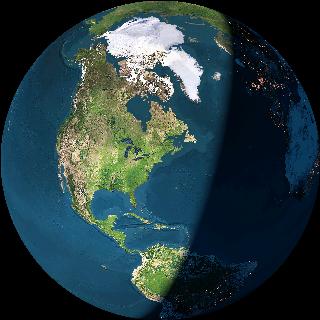
Click on the image above to see
a neat interactive Earth globe
To go to other pages on this site, use the Site Navigator at left, or click here to go to our Home Page.
Questions or comments?
editor@wreckhunter.netCopyright © 2001 by Dave Clancy
All Rights Reserved